Guest Agents
Overview
The guest agent is a program installed inside the guest OS allowing the host to run commands within the VM. This allows consistent, reliable backups by freezing the guest file system before snapshots and proper shutdown of a guest without reliance on ACPI, policies, etc.
Requirements:
- Enable the guest agent for the VM
- Installation of the guest agent within the guest operating system
Enable the Guest Agent
The guest agent must be enabled per VM; this can be done during VM creation or by editing an existing VM.
- From the Top Menu, click Virtual Machines -> List
- Select the desired VM
- From the left menu, click Edit
- Select QEMU Guest Agent
- Click Submit
Install the Guest Agent
Windows VMs
During the VM creation process there is an option to Attach Virtio Drivers. This option will automatically attach a virtual CD-ROM drive to the guest OS with the required Virtio installation files. If this option was not selected, you can still download the guest agent installation ISO from here.
- From the Top Menu, click Virtual Machines -> List
- Select the desired VM
- From the left menu, click Remote Console
- From the top menu click
 to launch the Change CD menu
- Select the desired virtio-win.iso file
- Click Submit
- Log in to the Windows guest OS
- Click Start -> Run
- Type devmgmt.msc to launch the Device Manager
- Right-click on PCI Simple Communications Controller
- Click Update Driver
- Click Browse my computer for drivers
- Click Browse
- Browse to the path of the CD-ROM drive containing the Virtio drivers
- Navigate to X:\vioserial\<os-version>
- Click OK
- Click Next
- In the Windows file explorer, browse to the CD-ROM drive containing the Virtio drivers
- Navigate to the guest-agent folder
- Run the MSI installer for your OS architecture.
| qemu-i386.msi | qemu-x86_64.msi |
|---|---|---|
Architecture | 32-bit (IA-32) | 64-bit (x64/AMD64) |
Address Space | 32-bit (Max 4GB RAM) | 64-bit (16 Exabytes) |
Performance | Generally slower | Generally faster |
Compatibility | Runs on 32-bit guests | Runs 32-bit & 64-bit guests |
Modern Usage | Niche, legacy systems | Default for most use cases |
A restart of the guest OS may be required to connect the agent to the host.
Linux VMs
On Linux virtual machines, the qemu-guest-agent package must be installed. Installation instructions will vary depending on your specific Linux distribution.
- On systems that use apt for installation (Debian/Ubuntu)
apt-get install qemu-guest-agent- On systems that use yum (Red Hat)
yum install qemu-guest-agent- Some distributions may require a reboot or manual start of the agent
systemctl start qemu-guest-agentVerify Guest Agent Connection
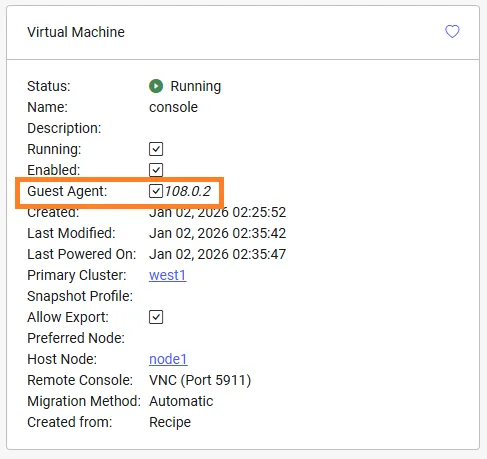
When a guest agent is successfully connected, the version number will display next to the Guest Agent checkbox on the VM dashboard.